Documentation sections
Reference
Decision reasons
Every click in the log has a decision reason. Some reasons are left over from older versions of the filter and appear only in old clicks; they're marked below. The reasons are grouped like this:
| Group | What it means |
|---|---|
| Bot / automation | Platform robots, ad verification services, spy services, headless browsers, programs instead of browsers, forged time on page. |
| Infrastructure traffic | Datacenters, hosting providers, proxy networks. Appears only in old clicks: new rejections for datacenters, VPNs and proxies are “High-risk network” in the “Campaign rule” group. |
| Campaign rule | A flow setting fired: country, city or region, device, OS, browser, network (ASN), ISP, referrer, schedule, IPv6, clicks per address limit, the script check, the trust score. Or the address is on your IP blacklist, or it has already been caught doing automation, on your account or other clients'. The labels “VPN or proxy blocked”, “Datacenter traffic blocked” and “Missing referrer” appear only in old clicks: such rejections are now called “High-risk network” and “Low-trust referrer”. |
| Allowed | “Allowed”, “Allowed by whitelist”, “Watched, not cut” (shadow mode), “Tracked, not filtered”. |
| Waiting page | The browser was given time to prove it's a real one: “Waiting for time on page”, “Left the page too fast”, “Sent to the waiting page”. Appears only in old clicks: now the click is recorded after the visitor has gone through the waiting page. |
| Flow or plan state | “Flow under review”, “Cloaking switched off”, “Flow is not running”, “No active plan”, “Click limit reached”. |
| Other | “Before filtering” (warm-up), “Offer did not load” (the White Page was shown so the click isn't lost), “The flow has no offer to send to”, “Shield: no paid click id”, “Second opinion: looks like your bots”, as well as rejections by browser language and time zone. |
Where they were cut
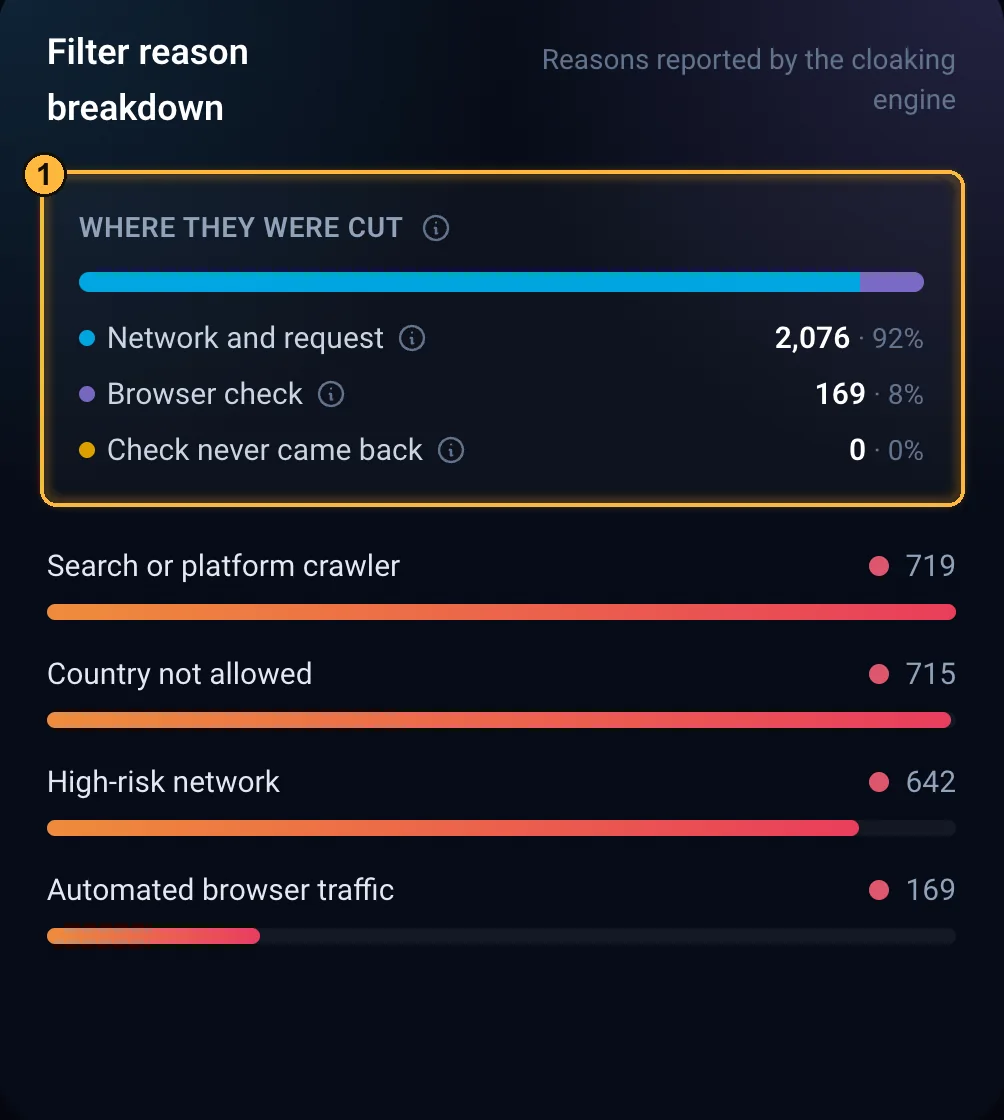
Every rejection belongs to one of three steps, much like ad measurement systems split invalid traffic into general (GIVT) and sophisticated (SIVT):
- Network and request: the visit was cut before the browser check: by address, network, ISP, headers, click tag and flow rules (country, device, schedule). This step catches the fewest real people.
- Browser check: the script ran, and its response revealed automation or didn't earn enough trust. This is where bots posing as people get caught, and also where the filter makes mistakes most often: if this share grows, check the strictness.
- Check never came back: the waiting page with the check was shown, but no response came. That's how programs without JavaScript behave. Such a rejection (“JavaScript required”) is recorded only if “Require JS” is on in the flow, and it appears in the log about a minute later. If this toggle is off, such a visit doesn't get into the log, and this step's share is always 0.
The shares of the three steps are shown above the list of reasons in Statistics, and an individual click's step is shown in its breakdown in the log.
ArtisanClo · Dashboard documentation. Questions — info@artisanclo.com or @artisanclo_support on Telegram.